
How to set up Megablob
Megablob is an Agar.io-style arena you drop straight into your TikTok LIVE. You actively steer one giant blob while your chat is the whole world around you - they rain food and buffs to grow you, or fire chasing hunters, bombs and freezes to drag you back down. Grow from 50 to 1000 mass and hold it for ten seconds to bank a win. This guide takes you from purchase to your first live round.
7 min readFive things and you're ready to go live.
- A TikBoom account and the launcher, running.
- Megablob, bought once (29,99 EUR) and installed from the launcher.
- TikTok Live Studio (or OBS) to capture the 1:1 overlay.
- A gift tool like TikTory or TikFinity for the gifts.
- A mouse - you steer your blob with it the whole round.
- 1
Buy and install from the launcher
Open the TikBoom launcher, find Megablob and buy it once for 29,99 EUR - it's yours to keep, updates included. The launcher downloads and installs it, then the Play button starts the game. Megablob runs as a single 1:1 window built to sit on your LIVE.
- 2
Add the 1:1 overlay to your stream
In TikTok Live Studio (or OBS), add a window or game capture source and pick the Megablob window. It's a square 1:1 view made for the TikTok stage - keep your streamer cam clear of the top and bottom, where the wins, mass bar and ticker live.
- 3
Learn the controls
Move your mouse and the blob follows your cursor - that's the whole game. Eat food pellets and smaller blobs to grow, and dodge anything bigger. Press Space to split for a burst of speed, and Esc for the menu. Prefer keys? Switch to WASD in Settings.
- 4
Build your gift webhooks
Open our visual webhook builder, pick an action, set it up with a slider and copy the ready-made link into your gift tool (TikTory, TikFinity, ...). Map a cheap gift to food or a hunter, a big gift to a shield or a score multiplier. The in-game Webhook Setup button opens the builder for you, already set to Megablob.
- 5
Go live
Start a round and watch the chat take over: every gift spawns food, a buff or sabotage right next to you, named after the viewer who sent it. Climb to 1000, survive the ten-second hold, bank your win - and let the chaos decide how far you get.
The overlay is a single 1:1 arena. Your wins and mass bar sit up top, active effects stack on the right, your magenta blob holds the center surrounded by food, and a minimap tracks the field. This is the real game on stream.
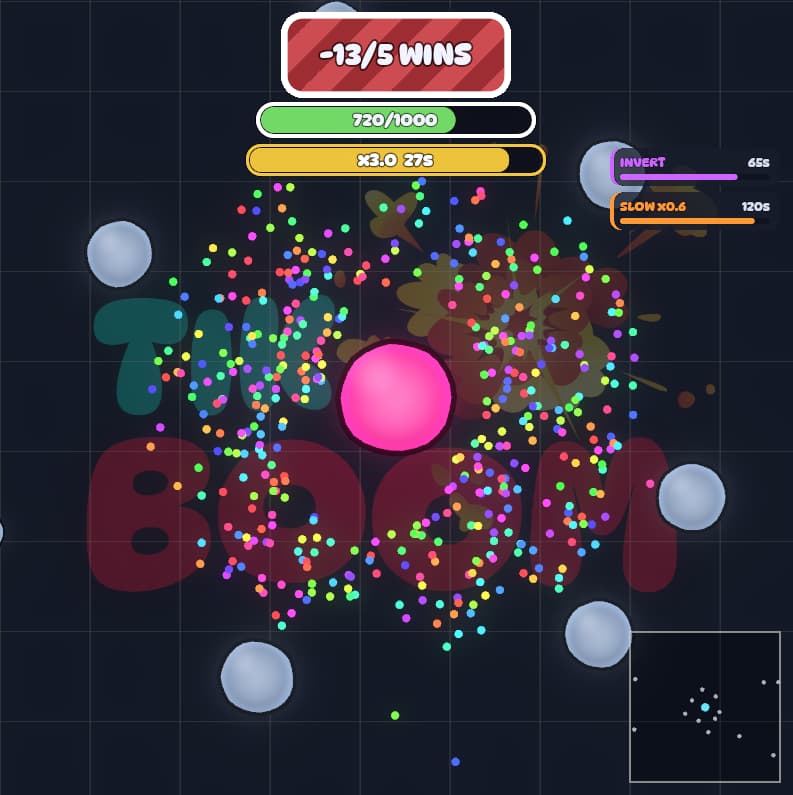
Every round runs the same loop - you steer your blob the whole time.
- You spawn at 50 mass and move around eating food pellets and smaller blobs to grow.
- Your chat gifts in real time - food and buffs push you up, hunters and bombs knock you back.
- Hit 1000 mass and a ten-second hold countdown starts; the whole bar turns gold.
- Drop below 1000 during the hold and the timer cancels - climb back over and it restarts.
- Survive the full ten seconds to bank a win and reset to 50. Reach your win goal and the session is won.
Every action is a webhook you map to a gift. They fall into five families - mix cheap gifts for constant chaos with rare ones for the big swings. You build any of them in the webhook builder.
Mass & food
Feed the streamer mass or scatter food pellets around them - or go negative to steal mass and snatch food away.
Help the streamer
Speed boosts, a shield, a food magnet, ghost mode, freeze every hunter, or a score multiplier that doubles all gains.
Sabotage
Slow or freeze the blob, invert the steering, repel food, leak mass over time, an icy floor or screen fog.
Threats
Spawn chasing hunters named after the viewer (with their profile picture), or bombs that hurt on contact.
Game
Force a split like the spacebar, or directly give and steal banked wins - the most brutal gift of all.
You never write a URL by hand. The webhook builder lets you pick an action, set its strength or duration with a slider, choose your gift tool and copy the finished link - no tech skills needed. It's also one click away inside the game via the Webhook Setup button.
These are the kind of links the builder produces. The launcher listens on a fixed port, so they never change. Keep {username} in the link - your gift tool fills in the viewer who sent the gift.
http://127.0.0.1:9870/webhook/megablob/mass?delta=45&username={username}http://127.0.0.1:9870/webhook/megablob/hunter?count=1&username={username}http://127.0.0.1:9870/webhook/megablob/shield?duration=6&username={username}http://127.0.0.1:9870/webhook/megablob/win?delta=-1&username={username}- Your blob can never die - sabotage only knocks it back, never below a minimum. The whole point is to keep you online and the chat invested.
- Every danger spawns relative to your blob, so a hunter is a fair threat whether you're at 80 or 900 mass - and it always appears on screen.
- Gifts with no name still work: the action fires anonymously, just without a viewer name on the blob and in the ticker.
- Tune everything in Settings: win goal, hold seconds, blob speed, food value, your blob color and volume. Drop your own sounds into the Sound folder.